
Turkish Airlines Flight Ticket
Turkish AirlinesTravel & Local
4.41.40K Reviews
- Version
- 1.49.3
- Installs
- 10.00M
- Age Rating
- Everyone
Screenshots
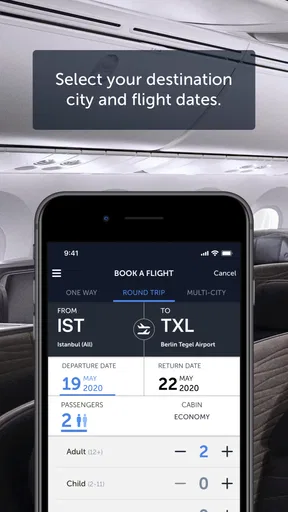
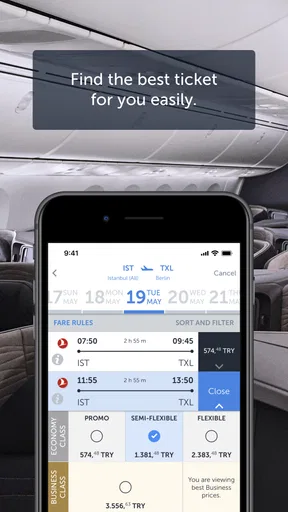
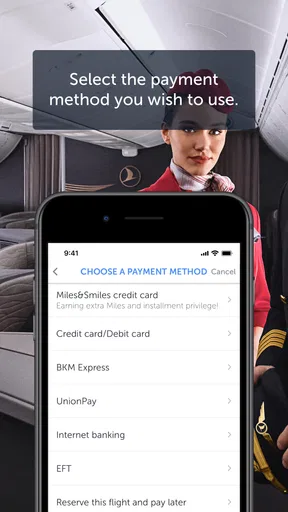
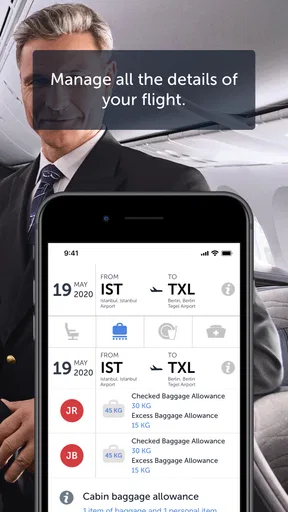
Our Review of Turkish Airlines Flight Ticket
 Analysis by Appyee
Booking a flight is one of those tasks where convenience matters, but trust matters just as much. I want to know that I am using the official airline app, that my booking details are handled in a way I can understand, and that I still have sensible choices when plans change. Turkish Airlines Flight Ticket is the travel app from Turkish Airlines, and my overall impression is that it is most useful when I am already considering a Turkish Airlines journey rather than looking for every airline in one place.
The app is free and aimed at everyone, which makes it easy to try before committing to an account or a booking. It has been available since October 10, 2017, and the current version is 1.49.3 for devices running Android 7.0 or later. Its presence on Android is substantial, with over 10 million installs, while its average score sits at 4.4 from around 147 thousand ratings. Those figures do not guarantee a smooth experience on every phone, but they do show that this is an established travel tool rather than a little-known booking utility.
I approached it less like a glossy airline brochure and more like something I would use during a real trip: checking a route, comparing dates, reviewing passenger information, and deciding how much personal information I am comfortable entering. That perspective is important because airline apps handle details that are more sensitive than an ordinary restaurant or weather app. A good experience is not only about finding a flight quickly; it is also about keeping control over the booking after payment.
What the app is really useful for
I find the app most useful once I’ve settled on Turkish Airlines and want a repeatable way to handle the trip, rather than starting every task from scratch. In this section, I’ll focus on the small habits that make checking a reservation and preparing to travel feel more orderly, especially when time is short. That practical routine also depends on knowing where personal details and account access deserve extra care.
A focused companion for Turkish Airlines travelers
The biggest strength is also the clearest boundary. This is the official app for Turkish Airlines, developed by Turkish Airlines itself, so it makes sense when the airline is already part of your travel plan. I would use it to manage a Turkish Airlines booking, check the details of a planned journey, or keep travel information close to hand while moving through an airport.
That focus is different from the role played by broad travel marketplaces. A comparison service is usually better when I am undecided between airlines, searching across a wide range of schedules, or trying to locate the lowest overall fare. The Turkish Airlines app is more direct once I have narrowed my choice to this carrier. Instead of treating the airline as one result among many, it gives the journey a single home.
This distinction saves time in a realistic situation. Imagine I am leaving work late, have already agreed to travel on a Turkish Airlines route, and need to check the booking before heading to the airport. Opening the airline’s own app is more practical than returning to a third-party search page and reconstructing the trip from scratch. I can concentrate on the reservation rather than repeat the discovery process.
Why the official channel can feel more reassuring
Trust is not automatic just because an app carries an airline’s name, but the developer identity is clear here: Turkish Airlines. That gives the app a straightforward role. I am not handing a booking task to an unknown intermediary whose main purpose is to resell or aggregate travel options. For a traveler who prefers to deal with the carrier directly, that clarity is valuable.
Still, I would not confuse an official app with a promise that every step will be effortless. Airline bookings can involve names, passport-related information, payment details, travel dates, and contact channels. The sensible approach is to read each screen, check the passenger name carefully, and avoid entering information simply because a form makes it convenient. The app can be official while the responsibility for reviewing what I submit remains mine.
I also like the fact that the app is not presented as a specialist tool for one narrow age group. Its Everyone content rating makes it suitable as a general travel companion, although younger travelers may still need an adult to handle payment, identification, or booking decisions. The rating describes accessibility of the app’s content, not the legal or practical requirements of buying an airline ticket.
Where it fits beside browser booking
For a one-time purchase on a shared computer, the Turkish Airlines website may still be more comfortable. A larger screen makes it easier to compare several dates, inspect fare conditions, and review a long passenger form. I would especially favor the browser when I need to keep another itinerary, email, or document visible at the same time.
The app becomes more attractive after the initial search. A phone is the device I am most likely to carry while traveling, so a dedicated airline application can reduce the friction of returning to a mobile browser. It is also a better fit for quick checks between other airport tasks, provided I take the time to confirm that I am looking at the correct reservation.
My practical rule is simple: use a comparison service to explore the market, use a browser when the booking is complicated, and use the Turkish Airlines app when the airline is chosen and I want a direct travel-management channel. That is a more realistic recommendation than claiming the app replaces every other travel tool.
Three habits that make the experience safer
First, I would review the passenger name letter by letter before moving past any final confirmation screen. A small spelling mistake is much more serious in air travel than it is in an ordinary online purchase. I would also compare the travel date and departure airport with the original plan, especially when booking from a phone late at night.
Second, I would separate browsing from commitment. Searching for a route is harmless, but a screen that displays a fare or itinerary is not necessarily the same as a completed booking. I would look for a clear confirmation step and retain the booking reference or confirmation message in a place I can access without opening the app.
Third, I would avoid using an unfamiliar public device for sensitive account work. If I have to check a trip at an airport or hotel, my own phone is preferable. When I finish, I would sign out if the device is shared and remove any temporary information that I no longer need. These are ordinary precautions, but airline apps deserve them because the information involved can affect an entire journey.
Trust, privacy, and control during a real booking
For me, confidence comes less from tapping through quickly and more from keeping each decision deliberate: checking the itinerary, reviewing what I enter, and retaining a separate record of the booking. I’ll look at the points where a traveler can stay in control without treating convenience as a reason to grant every request or rely on one device. Those choices shape how comfortably I’d use the app for an actual booking.
What I look for before entering personal details
The most important trust signal is not a colorful interface; it is whether the app gives me understandable choices at the moments when information is requested. Before entering passenger or contact details, I want to know why each field is needed and whether it is essential for the booking or simply useful for later communication. I do not treat a prefilled or optional-looking field as something I must complete without reading.
I also pay attention to the account boundary. If I am only checking a public route, I prefer not to create an account prematurely. If account access is needed to manage a reservation, I want to understand which credentials I am creating and how I will regain access later. A travel app is much easier to trust when it lets me distinguish between looking up general travel information and managing a personal booking.
Because this application is operated by the airline itself, I would expect the most sensitive moments to be the booking, payment, and reservation-management screens. Those are the places where I slow down. I verify the selected journey, passenger information, and contact details before confirming anything. I also avoid saving details on a device that other people use.
Permissions and visible choices
I judge permissions by necessity rather than by assumption. A permission request should make sense in the context of the action I am taking, and I prefer to grant access only when I understand the benefit. If a feature works without a particular permission, I would leave that permission disabled. If the app asks for access during a time-sensitive airport moment, I would still read the prompt instead of tapping through automatically.
This is not about distrusting every request. Travel apps may need certain access for particular conveniences, but the correct choice depends on how I use the app and how much convenience I want to exchange for access to device information. Someone who only wants to review a booking can reasonably be more restrictive than someone who wants every available phone-based convenience.
I also check the operating system’s permission controls after installation rather than treating the first decision as permanent. Android lets me revisit many permissions, and that gives me a useful second chance to reduce access later. The app supports Android 7.0 and above, so the exact appearance of these controls can differ between older and newer devices. The principle remains the same: I want the phone, not the app, to be the final authority over access.
Data-sensitive moments that deserve extra attention
Passenger information is the obvious sensitive area, but travel context can reveal a lot as well. Dates, airports, companions, and contact details together describe where I am going and when. I therefore avoid discussing a booking aloud in crowded places and do not leave confirmation screens visible when handing my phone to someone else.
Payment is another moment where I become deliberately slow. I confirm that I am on the intended airline channel, check the total before authorizing it, and avoid switching between several apps while a payment is processing. If the screen appears to stall, I do not immediately press the payment button again. I first check whether a confirmation, bank notification, or booking reference has already appeared, because duplicate attempts can create unnecessary confusion.
Account recovery deserves similar care. I use a password that I do not reuse for unrelated services, and I keep recovery information current without exposing it in screenshots or casual messages. If I am traveling with someone else, I share only the booking information they actually need. Sending an entire account screen is rarely the safest way to communicate a flight detail.
How much control does the traveler retain?
In my experience, the best way to keep control is to treat the app as a tool, not as the owner of the trip. I decide when to sign in, which information to enter, which permissions to allow, and whether I want to keep the app installed after the journey. I also keep an independent record of important booking information so I am not helpless if my phone battery dies or the app is temporarily unavailable.
That last point is easy to overlook. A phone app is convenient, but it should not be the only place where I store a flight reference or travel plan. I would keep the confirmation in an email account I can reach through another device, and I would carry the basic details needed for the airport. This is not a criticism unique to Turkish Airlines Flight Ticket; it is a sensible backup habit for every airline app.
I would also be cautious about logging in on someone else’s phone, even if the person is helping me. If that becomes unavoidable, I would use the minimum access required, avoid saving credentials, and sign out immediately afterward. The ability to complete a task quickly is useful, but it should not remove my control over the account.
Who will appreciate it, and who should choose something else?
I think the app is a strong match for travelers who regularly fly with Turkish Airlines, people who want a direct airline-managed booking experience, and passengers who prefer having trip information on their phone. It is also suitable for someone who has already compared options elsewhere and now wants to manage one selected carrier without juggling a marketplace interface.
I would be less enthusiastic about recommending it as the first stop for a traveler whose main goal is broad price comparison. If I am flexible about airlines, airports, or connections, a multi-airline search tool is likely to be more useful at the discovery stage. Likewise, a traveler who dislikes entering personal information into mobile apps may prefer using a browser for the initial purchase and keeping the app only if its ongoing convenience justifies it.
People with older devices should also check compatibility before planning around it, since Android 7.0 is the stated minimum. That is not an obstacle for many users, but it matters if the phone has not been updated for years. I would not wait until the airport to discover that the device cannot run the current app comfortably.
My cautious verdict
Turkish Airlines Flight Ticket earns its place as a focused companion for Turkish Airlines journeys. I like its clear connection to the airline, its free entry point, and the practical advantage of having a carrier-specific tool available while traveling. Its established release history and broad Android adoption add reassurance, but I still judge it by the choices it gives me at each sensitive step rather than by popularity alone.
My recommendation is to use it when you have chosen Turkish Airlines and want direct control over that trip, not as a universal replacement for comparison services. Take a few extra seconds with names, dates, payment confirmation, permissions, and account access. Those checks make the app more dependable in real life and prevent the most avoidable booking mistakes.
After testing it as both a booking aid and a trust-sensitive travel tool, I see it as useful rather than magical. It can simplify the journey, but it cannot decide whether a fare suits your budget, whether you should share a device, or how much personal access you are comfortable granting. Those decisions remain yours, and that is exactly how I prefer to use an airline app.
For travelers who want a direct mobile connection to Turkish Airlines, I would install Turkish Airlines Flight Ticket and keep it available for the trip. For travelers still comparing carriers or who prefer a full desktop workflow, I would begin elsewhere and use the app only when its airline-specific convenience becomes worthwhile. That balanced approach gives the app a clear role without asking it to do a job it was not designed to replace.
Verdict
Strengths of Turkish Airlines Flight Ticket
- Useful Miles&Smiles rewards for frequent Turkish Airlines travelers.
- Large global network makes international connections easier to arrange.
- Mobile boarding passes reduce the need for printed travel documents.
- Flight status updates help passengers monitor delays and gate changes.
- Multiple payment options can make ticket purchases more convenient.
Limitations of Turkish Airlines Flight Ticket
- Some promotional fares have strict change and cancellation conditions.
- Extra baggage fees may apply when the fare allowance is limited.
- App performance can vary on older phones or slower connections.
- Seat selection may cost extra on certain routes and fare types.
- Refund processing can take time after a canceled booking.
Similar Picks in This Category
View All
Google Maps
Google LLC3.4

Google Maps Go
Google LLC4.1

Booking.com: Hotels & Travel
Booking.com Hotels & Vacation Rentals4.8

Google Earth
Google LLC3.8

Skyscanner Flights Hotels Cars
Skyscanner Ltd4.8

trivago: Compare hotel prices
trivago N.V.4.4
Frequently Asked Questions
How can I book a flight with the Turkish Airlines app?
After installing the Turkish Airlines app, enter your departure and arrival airports, travel dates, passenger details, and preferred cabin class. The app displays available flights, fares, baggage information, and connection times. You can select a flight, add optional services, enter passenger information, and complete payment through the supported methods before receiving your booking confirmation and electronic ticket.
Can I check in and choose my seat through the app?
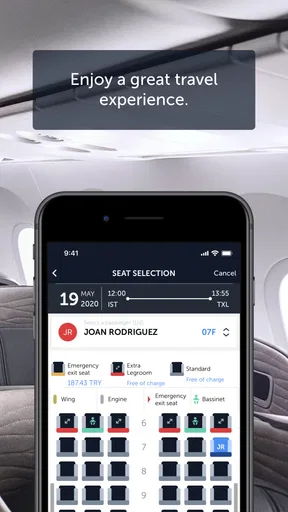
Yes, the Turkish Airlines app generally allows eligible passengers to check in online before departure and select or change a seat, depending on the route, fare type, aircraft, and availability. Check-in opening times can vary, and some airports or special passenger categories may have restrictions. Always review the final boarding pass and airport instructions in the app.
Does the app show baggage allowances and extra baggage prices?
The app provides baggage details associated with your selected flight and fare, including cabin baggage rules and checked baggage allowances where available. Passengers can often purchase additional baggage or other travel services during booking or through the reservation-management section. Because allowances may differ by route, ticket class, and loyalty status, verify the information for your specific reservation.
What payment methods are available for purchasing Turkish Airlines tickets?
Payment options can vary according to the departure country, currency, booking channel, and device. The app may support major credit or debit cards and, in some markets, additional local payment services. Before confirming a purchase, carefully check the total price, taxes, currency conversion, and any optional extras. A successful transaction should generate a confirmation number and ticket details.
Can I change or cancel a Turkish Airlines flight booked in the app?
Many reservations can be managed through the app, including checking fare conditions, changing travel dates, or requesting cancellation. However, eligibility and fees depend on the ticket rules, route, fare family, and how close the request is to departure. Some tickets may be non-refundable or require a fare difference. Review the conditions shown for your booking before making changes.
